ChannelDeck Live Media Player
← All products

CHANNELDECK NETWORK

Turn your personal media collection into your own streaming service.

ChannelDeck Network turns a Windows or Linux computer into your private home media server. It catalogs the Movies, TV shows, episodes, and Music stored on that computer or its connected storage, downloads and manages metadata and artwork, and streams the library to ChannelDeck on TVs, phones, and tablets. It is the server behind your personal media library—not another playback-only app.

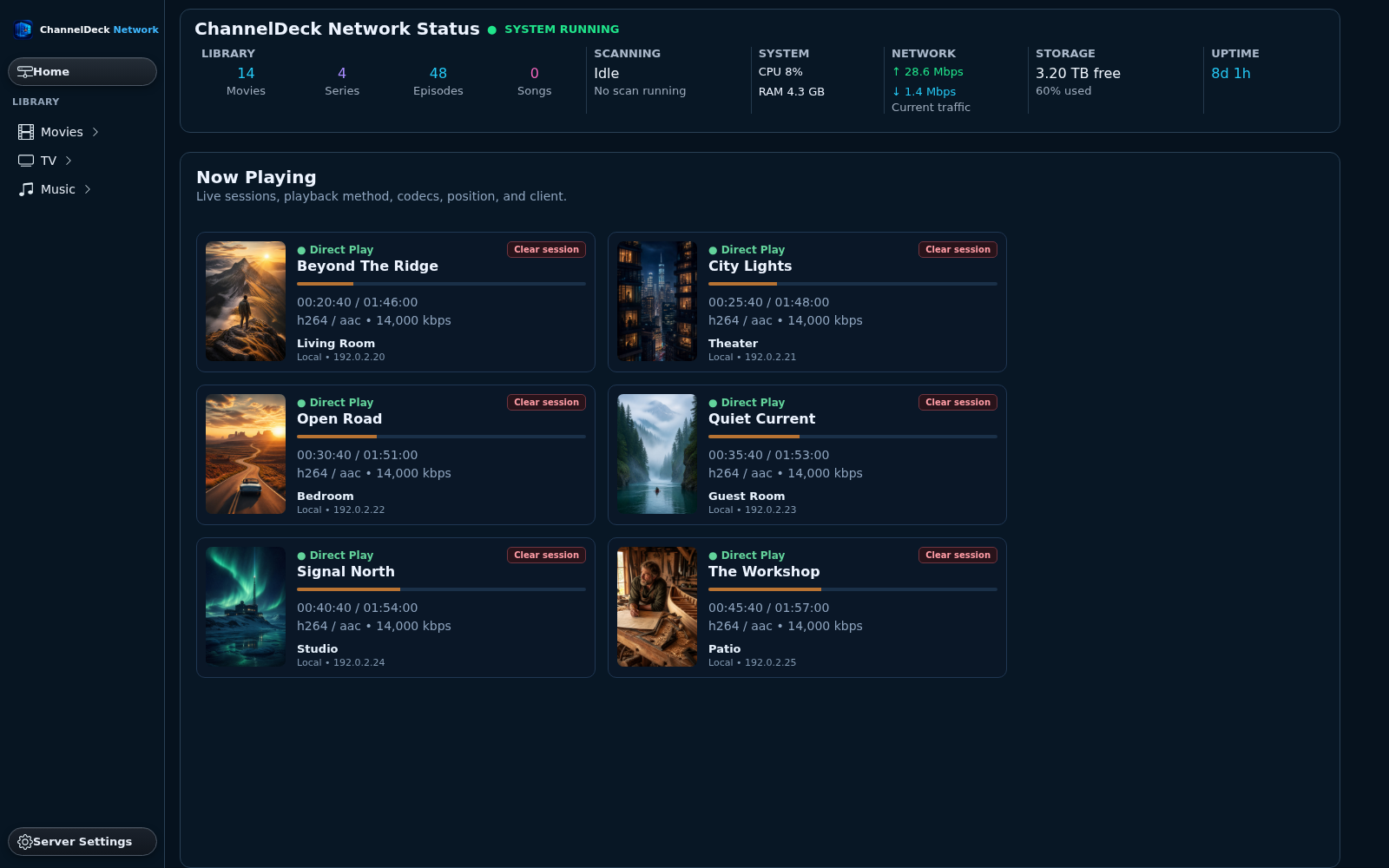
ChannelDeck Network server dashboard with system and library status

NETWORK UPDATE · LINUX 0.1.60 · WINDOWS 0.2.39

Clearer browsing and episode matching

The alphabet selector stays in view across Movies, Music and TV. Shorter library bars and inset editing panels keep controls reachable, while the main screen stays free of visible scrollbars. Episode matching now displays TVDB search results, and episode cards show runtime and codec without file size.

This update also includes movie trailer lookup and playback, plus reliable delivery of saved artwork to authorized clients. Compact album cards, household profile popups, saved metadata, artwork and playback progress are preserved.

THE FULL PRIVATE SERVER

ChannelDeck Network is the central personal-media server for the ChannelDeck ecosystem. Install it on one Windows or Linux computer, point it at your media folders, and it builds the household library that ChannelDeck TV and Mobile devices browse and play at home or away.

Compare where it fits

WHAT IT DOES

Everything you expect from a personal media server.

  • Runs as the central server that organizes and streams your household's personal media collection
  • Watches the personal-media folders you choose and builds browsable Movies, TV Shows, and Music libraries
  • Identifies titles, organizes shows into seasons and episodes, provides readable A–Z navigation, downloads metadata and artwork, and lets you correct matches or replace artwork
  • Streams your library to ChannelDeck TV and Mobile clients on your home network or directly across the internet while you are away
  • Direct-plays compatible files and transcodes incompatible or bandwidth-heavy video; supported NVIDIA, AMD, and Intel hardware can accelerate conversion
  • Provides a browser dashboard to add libraries, start scans, edit media, configure remote access, maintain the database, manage transcoding, and assign friendly names to household clients
  • Includes a password-protected Monitor with live playback, users, library statistics, watch history, device and connection details, bandwidth, buffering, and transcode status
  • Pairs TV and Mobile clients with a short one-time code, so viewers do not type the server IP address or port
  • Includes every Network feature in a seven-day trial with no payment card, followed by a seven-day money-back guarantee if you purchase

WHAT YOU NEED

What it works with.

  • A supported 64-bit Windows PC or Windows Server, or a Debian-based installation on physical hardware, in a compatible LXC container, or in a virtual machine—including deployments hosted by Proxmox or another hypervisor
  • Storage containing media you own or are authorized to use
  • A direct network path for remote streaming; ChannelDeck does not relay the media
  • Server administration through a local web browser

SEE IT IN ACTION

ChannelDeck Network, screen by screen.

Select any screenshot to view the complete interface at full size.

Server command centerSee your library, system status, and current playback together.
Monitor every sessionCheck server health, playback progress, connected devices, and recent activity.
A complete movie libraryBrowse posters, search your collection, and open metadata or playback controls.
Edit movie detailsReview artwork and file details, correct metadata, and search for a different match.
Control transcodingChoose encoding, hardware acceleration, audio, and stream limits for your server.
See what is playingSwitch to artwork cards for a visual overview of active sessions.
Inspect a sessionOpen the details of a playback session from the monitoring dashboard.
Manage your serverAccess media sources, library settings, metadata agents, remote access, and networking.

CLEAR BOUNDARIES

Know exactly what you are getting.

Network is a private server package, not the $19.99 Premium upgrade. Its full seven-day trial is limited to one server per account and cannot be reset by reinstalling. A Network purchase is backed by a full seven-day money-back guarantee. Server data remains in place after expiration. Native Windows x64 and Linux amd64 builds are available; macOS, ARM, and native NAS packages are not yet offered.

See the exact package and price.

Compare every ChannelDeck product, requirement, device allowance, and one-time purchase on one page.

View pricing & comparison

IPTV PLAYER GUIDES

Build the viewing setup that fits your devices.

Installation, playlists, program guides and Premium viewing tools.